


The Domain Name System is not just the front door to the internet – it is used to help network operators identify and manage infrastructure. While a domain name like example.com might be used to identify a website, DNS names are also assigned to other network components including router interfaces, switches, each network server interface, and for transient network clients like laptops and tablets.
Most enterprises will have more DNS names than unique IPv4 addresses, with some names serving as aliases for others. Each IP address has a corresponding reverse DNS entry pointing at a preferred name.

Manual Versus Automation
Most organizations employ security policies that limit network administrative access to the people directly responsible for managing it. For example, database teams that manages can’t install software on laptops and client software managers don’t have access to chage network configurations.
This is a challenge when managing DNS and DHCP manually. For a medium sized company, there are many assets that need DNS names:
- Public website
- Parked domain names
- Website CMS
- Network infrastructure
- Internal servers and storage
- Client machines
- Visitor machines
A parked domain name could have as many as 20 DNS records, including records for nameservers, IPv4 and IPv6 website addresses, aliases, and mail servers. The company’s main domain is likely to have even more DNS records.
DHCP can be managed manually – there is even a humorous document describing how to manage it using clothes pegs labeled with IP addresses – but in current enterprise environments, DHCP is also used for recording where and when assignments occur. Automating DHCP and integrating with DNS makes DHCP an auditable security control.
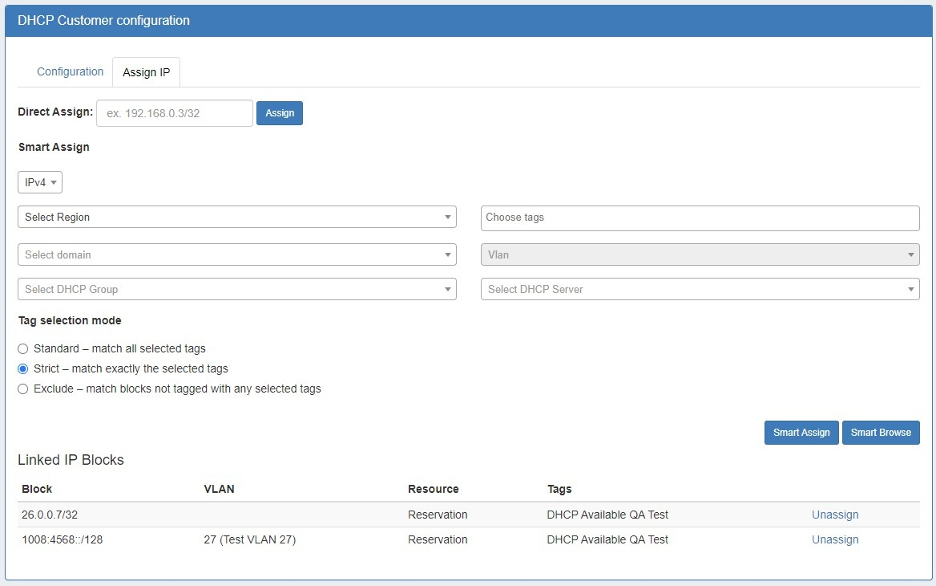
An example of a DHCP Gadget
Many DNS records and IP address assignments remain static for years. However, DNS records for company laptops and visitor devices often required rapid provisioning and removal. Typically, these types of private internal records are managed in a split-horizon DNS configuration, ensuring external users do not gain access to private information.
Automation results in fast, efficient changes – but it delivers much more than speed. With automation, errors are reduced, and security is enhanced. Names for private services won’t be found in the publicly available DNS, because automated systems will always assign private records to the correct DNS zone.
Additionally, automation provides the advantages of a database driven change history. You don’t need to worry about harried admins keeping manual records of what changed and when. Instead, changes immediately are logged as they occur, and give the option for export and review of your change history as a security control.
Integrations and Gadgets
Ensuring security control is even more important now that many companies outsource their authoritative DNS to specialist service providers. DNS, just like other protocols, evolves over time. There are now over 100 documents describing the base protocol, with more than a dozen published in the last five years. Many organizations choose to have specialist services run DNS for them, which can also give them more reliable DNS via anycast deployments.
However, it is essential that communication with external services be securely managed.
Instead of circulating credentials among multiple teams for your chosen DNS service provider, using gadgets that can connect using the provider’s API, keeping credentials secure. The gadgets can be used to perform actions quickly and efficiently, using preset workflows to make changes automatically in the background.
For example, a status DHCP reservation for a new public server cab automatically trigger updates to the forward and reverse DNS zones, making the new entries visible to the whole world in minutes. That’s considerably faster than opening a change request with the relevant team’s internal ticketing system and waiting for it to be acted on.
And our gadgets let you build once and automate always. Your teams can share gadgets, so everyone works to the same process.